Important Tips for Removal of Old Security Systems

Why You Should Properly Remove Your Old Security System
Important Note: Many hardwired security systems are powered by 230V mains electricity; disconnection or removal must be carried out by a qualified electrician.
Upgrading your home or business security system is a great way to improve protection and take advantage of modern smart technology. However, the removal of old security systems is a step that should not be overlooked. Improper removal can lead to security vulnerabilities, damage to property, and even regulatory issues in some cases. Whether you are transitioning to a wireless system, installing a smart security setup, or simply decommissioning an outdated system, following the correct removal process is essential.
In this article, we’ll outline important tips for safely and effectively removing your old security system, ensuring a smooth transition to new technology while maintaining the security of your property.
1. Assess Your Current Security System
Before removing your existing system, take time to assess what components are in place and how they function. Some elements of a security system may still be useful, while others may be outdated or redundant.
Checklist for System Assessment:
- Identify all wired and wireless components (alarms, motion detectors, cameras, control panels, sirens, etc.).
- Check whether any parts are still functional or if they have deteriorated.
- Determine if the system is integrated with other home automation devices.
- Verify if the system is monitored by a security provider (contact them before removal to avoid false alarms).
If your system still has working components, consider whether upgrading or integrating with a modern system is a better option than a complete replacement.

2. Notify Your Alarm Monitoring Company (If Applicable)
If your existing security system is monitored by a security provider, it is crucial to notify them before starting the removal process. Failure to do so may trigger false alarms or result in unnecessary emergency response dispatches.
Steps to Take:
- Contact your monitoring company and inform them about your decision to remove the system.
- Ask if there are any contractual obligations or penalties for disconnecting service.
- Request assistance or instructions for safely disabling monitored features.
Many monitoring companies have specific deactivation protocols to prevent disruption.
3. Power Down the System Before Removal
To ensure safety, always disconnect power sources before removing any security components. Many security systems have multiple power connections, including mains electricity and battery backups.
How to Safely Power Down Your Security System:
- Turn off the main power supply – Locate the circuit breaker or power source and disconnect it.
- Disconnect backup batteries – Most control panels and alarms have internal batteries. Open the panel and remove them.
- Verify system shutdown – Check that keypads, alarms, and other devices are completely powered off before proceeding.
Properly shutting down the system prevents electrical hazards and avoids accidental alarm triggers.

4. Carefully Remove Wired Components
Many older security systems use wired sensors and alarms, which require careful removal to avoid damaging walls or electrical wiring.
Best Practices for Removing Wired Security Devices:
- Label all wiring before disconnecting to keep track of connections if needed later.
- Use the appropriate tools (screwdrivers, wire cutters, etc.) to avoid damaging fixtures.
- Patch and repaint walls if removing keypads, motion detectors, or old camera mounts.
- Dispose of old wiring properly or keep it for repurposing.
For those planning to upgrade to a wireless system, consider using a wired-to-wireless converter rather than completely removing all existing sensors.
5. Handle and Dispose of Old Equipment Responsibly
Some components of an old security system may contain hazardous materials or sensitive data that require careful handling. Proper disposal is essential for environmental and security reasons.

Safe Disposal Tips:
- Recycle electronic components – Many councils and retailers offer e-waste recycling programs.
- Securely dispose of hard drives and memory cards – If your system includes recording devices, ensure all data is erased before disposal.
- Check local regulations – Some locations have specific disposal laws for security and surveillance equipment.
- Consider reusing or repurposing functional components in a new setup.
For businesses, securely wiping all system data is essential to prevent security breaches.
6. Plan for a New Security System
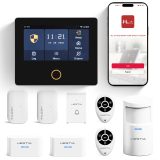
Once your old system has been removed, it’s time to consider an upgraded security solution that meets your current needs. Hestia modern security systems offer wireless connectivity, smart home integration, and remote access, making them a far more convenient and effective choice.
Upgrading to a Smart Security System:
- Choose a wireless smart security system to eliminate complex wiring.
- Look for cloud-based monitoring for easy remote access.
- Consider systems that support mobile app control and automation.
- Integrate with other smart home devices such as lighting, door locks, and cameras.
For those who want to retain existing wired sensors while upgrading to a wireless system, consider using a wired-to-wireless converter, like SAFE-TECH’s Converter Box, which allows you to upgrade without needing full reinstallation.
Final Thoughts: Removing Your Old Security System the Right Way
Upgrading your security system is an important step towards better protection, but the removal of your old system requires careful planning. By assessing your current setup, following proper deactivation procedures, safely removing wired components, and responsibly disposing of old equipment, you can ensure a smooth and secure transition.
If you’re looking for an efficient way to modernise your security without the hassle of rewiring, explore solutions like SAFE-TECH’s Wired-to-Wireless Converter, which allows you to upgrade without removing all your old sensors.
🔗 Learn more about smart security upgrades here: SAFE-TECH Wired Security Sensor to Wireless Converter Box
Protecting your home or business has never been easier!